I’ve been an Updraft client for over a decade yet recent events have caused me to stop and consider how secure using Updraft for commercial backups is. The occasion of my re-thinking this was taking on a new client whose prior hosting provider is using Updraft for backups. It didn’t go well. Here is why.
The Problem
A company approached us to take on their IT Support, and web hosting, as they were having problems with their current provider. Thy have a website, backed up using Updraft. So after figuring out what they needed, doing some due diligence to see if there were issues with hosting them, we said yes and started the process of transferring them to a new server..
Step 1: We downloaded their backups from their site, and restored them into our secure staging server for testing. On bringing up a web browser and going to the staging URL we were presented with a whole different site to theirs.
Step 2: Mutter what the heck? Try again!. Going back to their production site we checked and could see dozens of backups. The issue is Updrafts backups only present a button to restore the backup or to download a copy of the backup – no data about the backup other than date appears. The next backup downloaded was also wrong
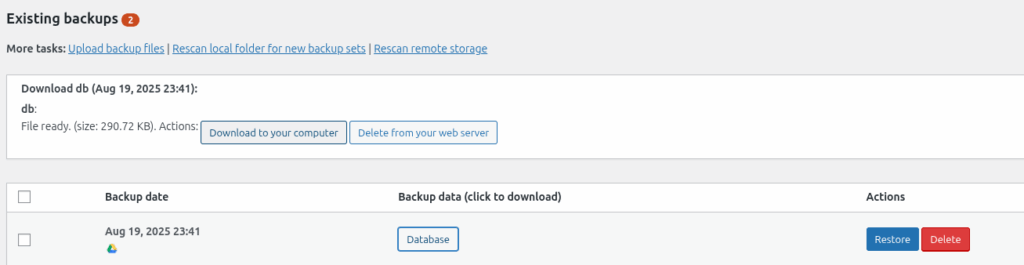
Step 3: I choose multiple backups to download to try to make sense of where things went wrong. As they started to download I noticed they were for websites that were not my client. Unfortunately the only way to see if they were my clients were to download them and watch the file name. After downloading eight different sites worth of data I finally found a backup that was truly for my client’s site.
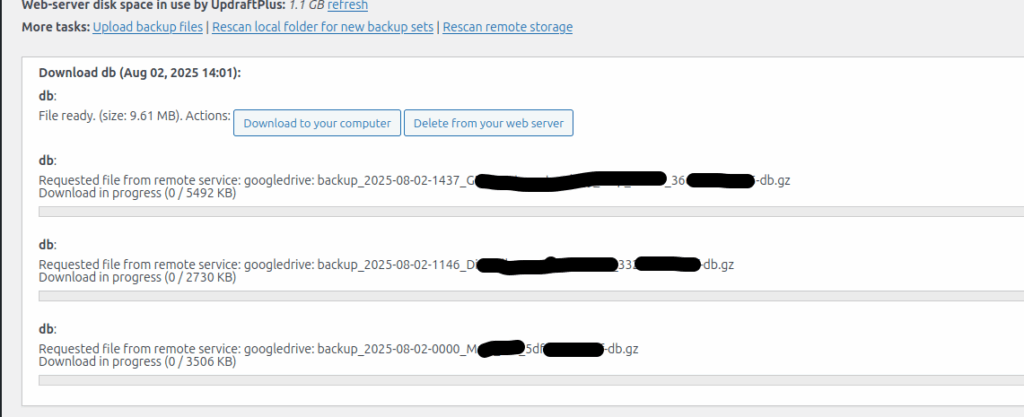
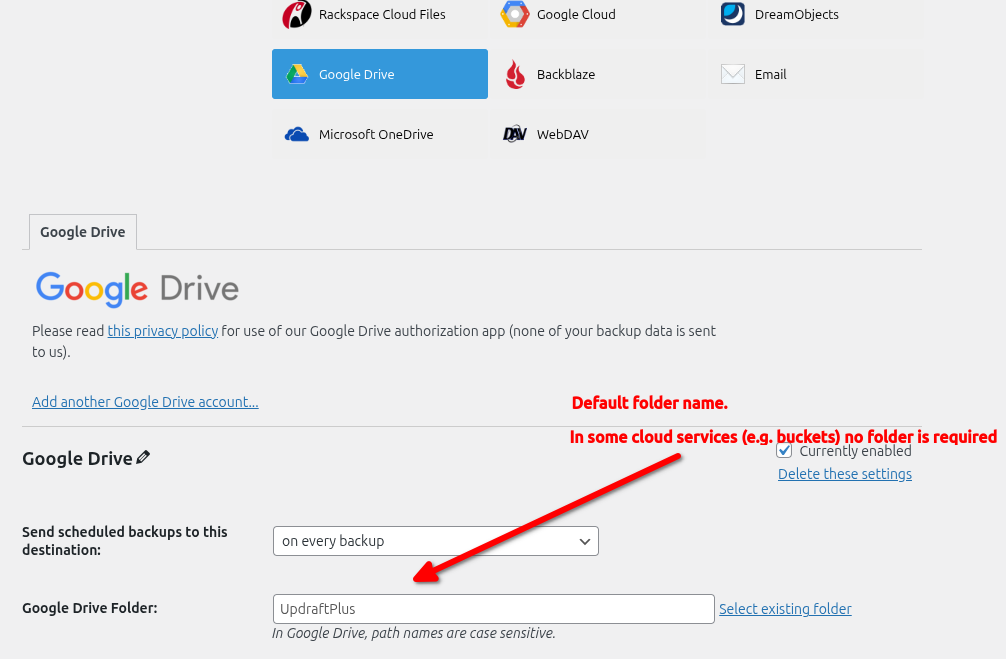
To cut a long story short, this got me wondering how this data breach had happened. Looking at the settings I noted that the settings for saving to Google Drive had a generic folder name:
Testing Starts
My suspicion is that all the clients on the previous providers server are using the same folder name, either a default or the same generic name.
I contact Updraft support to query this and get told it is buyer beware – the person using Updraft should put them in different storage or folders. Updraft do not think this behaviour is their concern.
Strike One: I believe all software should use secure defaults straight out of the box – not require the user to tick every box. A user should be competent but the supplier also bears some level of responsibility. Updraft wont shoulder theirs.
This then got me thinking – exactly how deep does this rabbit whole go?
So I set up a test.
- Three default WordPress installs,(site1, site2, site3)
- Updraft upgraded to pro version and and updated to the latest version.
- A new Google Drive account
The sites were all in their own Docker instance with their own Apache server, MySQL DB and PHP instance. All dockers were in their own folder. Zero overlap or ability to cross contaminate each other.
Let the testing begin:
- Site1 : Setup with Google Drive backup into GoogleDrive/Backups/Site1. Backups run
- Site2 : Setup with Google Drive backup into GoogleDrive/Backups/Site2. Backups run
- Site3 : Site1 : Setup with Google Drive backup into GoogleDrive/Backups/Site1 Backups Run
On completing Site3’s backup, I went back to Site1 and pushed RescanRemoteStorage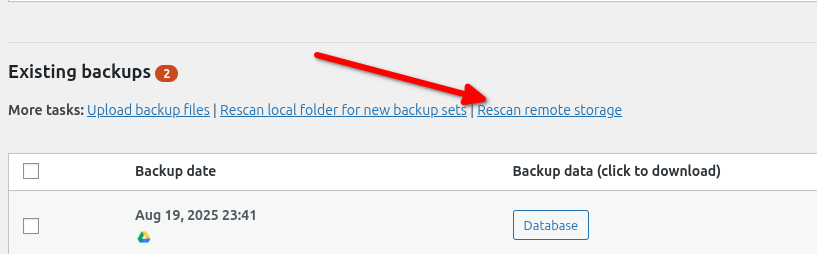
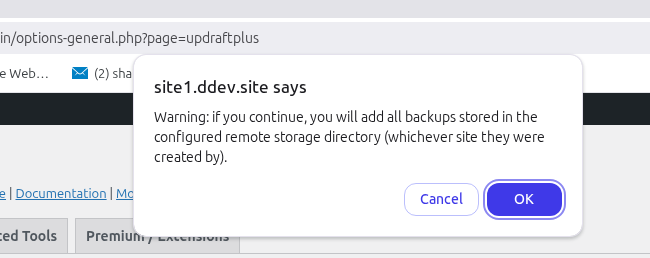
Now to Updrafts credit, they do pop up a warning , “Warning: if you continue, you will add all backups stored in the configured remote storage directory (whichever site they were created by).”
However by then I had had Updraft pop up messages for Africa, and suspect the chances of someone getting click happy are pretty high.
As expected I could now see backups for both Site1 and Site3.
Strike 2: At this point my thinking was, “Updraft are a product you need to watch very very carefully before you set it loose.” You need to have excellent attention to detail to ensure zero bad configurations get put into production. Again I believe Updraft should have some level of responsibility to ensure safety. A simple check to ensure that the backups seen match the site name, or that the random number at the end of each backup name matches a short hash for the site name – or something similar. Not a laissez-faire let anything get pulled down that’s in the folder.
So that’s two strikes. and it was enough for me to wonder exactly how insecure this system is. So I put on my security testers cap and decided to push this further. Could I show a complete failure of security.
Updraft say you should put site backups in different folders. I’ve done that. Site1 and Site3, are both pointing at GoogleDrive/Backups/Site1. Lets alter the setting in site2 from GoogleDrive/Backups/Site1 to GoogleDrive/Backups/Site2. After all, if i was a bad actor that would be my first step to see what else I could find – exploit a file system with what looks like a guessable naming pattern to it. A quick iteration over probable names.
So I changed Site2’s destination from GoogleDrive/Backups/Site2 to GoogleDrive/Backups/Site1 and then pushed the Rescan remote storage button.
Sure enough, I now have backups for Sites 1, 2, and 3 in my list of backups. Yes I can download them. Yes I can restore the database and see contents.
Strike 3: Zero protection to prevent a user seeing other folders and downloading their backups using simple iteration
So how would I use this issue beyond stealing user names,emails,sales figures and other info (if I was a bad actor – not me personally of course)? I think the easiest would be download my targets DB, restore it on my system, match my systems site name to theirs, add in a new admin user and then run a backup so my backup is in amongst theirs. Then when they restore it, I have admin access.
Now I can hear people saying, “Hey, there’s no way the file names are based on something changeable like the sites title, and not the URL!!” Turns out the backups are named after a changeable value, the Site Title. I changed Site1’s title to be Site1_BAAAAD_ACTOR . The screen shot below shows me deleting the resulting backup file.
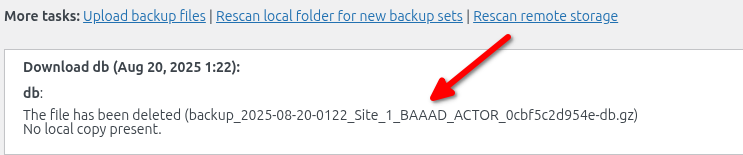
Strike 4: Zero protection stopping a bad actor spoofing file names on backup storage
Strike 5: Allowing a backup to save files into a different folder to the one originally setup (changed Site2 to Site1 and saved)
Surely that’s it? Unfortunately no. It got me thinking. If I can change locations within folders with the same base folder as my site – (e.g. GoogleDrive/Backups/site <add number here> ) can I breach folders in the same GoogleDrive but not the same base folder I am in?
Turns out you can. It’s not as straight forward but it is easily doable. Here’s how.
When you setup Updraft to use GoogleDrive as the cloud backup, it puts a default folder name in the settings, called UpdraftPlus.
So I changed Site1’s backup folder from GoogleDrive:\Backups\Site1 to GoogleDrive:UpdraftPlus, manually copied backup files from Site3 into that folder, pushed refresh and got nothing other than a message it hadn’t made backups in that folder. I also moved site1 backups in there (using GoogleDrive) and got nothing other than another message that it hadn’t saved backups in that folder.
Whew – I can use separate folder names in GoogleDrive, as long as they are base folders e.g. GoogleDrive:Site1, GoogleDrive:Site2 etc and be safe as Updraft tells us no backups have been saved there.
Hang on – “no backups have been saved there” … hmmm . …. Lets change that.
So I pushed the backup button on Site1 and it created a backup in GoogleDrive:UpdraftPlus – letting me create polluted backups for who ever is in that folder.
Strike 6: Updraft can create files in different base folders to the one it was authorised into.
And here’s the real kicker ….
Strike 7: After creating backups in unauthorized base folders, pushing rescan remote storage, now shows all backups in the UpdraftPlus folder, as it has now created a backup in that folder.
Summary:
My testing leads me to believe Updraft is highly insecure when configured to use certain cloud storage providers. I haven’t tested others but I suspect this issue will flow into buckets and other storage systems.
Oh – Strike 8. One authorised – all authorised.
When authorising Site1 i had to go through all the stages of authorising Updraft to use GoogleDrive. Once that was done none of the other sites required me to go through that same complete authorisation process. Why? Because Updraft is authorized to use the GoogleDrive folder, and that holds true across multiple sites on different servers and file systems (although same gateway IP address) .
Was it because I was logged into Google? Maybe but even logged in I had to authorise Site1 but whatever combination token or authorisation Updraft uses with GoogleDrive, it will work even on different servers when you use GoogleDrive under the same google account. I suspect GoogleDrive is fed a token that says Updraft:Authorsied under user Accont2google. Authorized for one, authorized for all.
Can you mitigate this?
You can encrypt your database on backup. that means anyone getting your Db wont be able to read it (unless they crack the encryption). But it doesn’t stop people polluting your backup folder. If they load an unencrypted DB backup into your backups, then that will be restored on your system if it is chosen. Polluting the Db isn’t the only option. Bad code in the theme, bad plugin code, altered settings, altered PHP. Its all possible.
Short of having a different GoogleDrive for each site, or a different bucket, or using a system that demands each and every instance is authenticated and then separates folders by specific instance, then you better not let your clients near your backups. And if you do, then you better hope they aren’t half as curious as I am.
